Q07
Q07 SDA versions
Reported working on 1.4.x, 1.5.x, 1.6.x, 1.7.0 and 1.8.0. Firmware can vary by region; compatibility is not guaranteed.

INDEPENDENT ANDROID HEAD-UNIT UTILITY
Qiyuan OS brings useful app management, gesture controls and display tools to Changan Qiyuan Q07 and A06 head units.
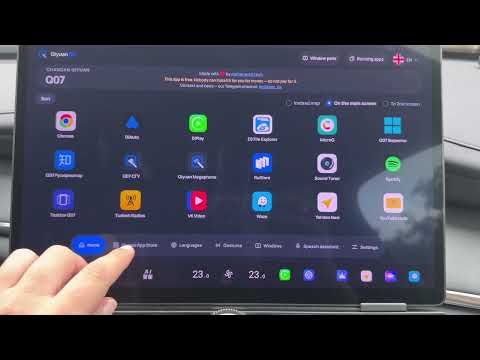
Qiyuan OS screenshots from a Q07 head unit. They show the app interface and are not a compatibility test.
No purchase or subscription fee for the app. This statement is about the app price; hosting, support, updates and availability are not guaranteed forever.
Qiyuan OS is free, and the project charges no official installation fee. Don’t pay anyone who claims to collect an installation fee on behalf of the project.
CHANGAN QIYUAN · NEVO · DEEPAL
Q07
Reported working on 1.4.x, 1.5.x, 1.6.x, 1.7.0 and 1.8.0. Firmware can vary by region; compatibility is not guaranteed.
A06
Reported working on 1.3.4, 1.6.0 and 1.7.0; reports indicate it does not work on 1.7.1. Firmware can vary by region; compatibility is not guaranteed.
QIYUAN OS · ANDROID HEAD UNIT
See installed and available apps in a clear, head-unit-friendly interface.
Set up supported screen gestures for common actions; use them only when safely parked.
Use model-aware display tools for supported Q07 and A06 screen layouts.
Choose language, car model and app settings on the device.
ADB · APK SIDELOAD
Download the installer (Windows .exe) and the Qiyuan OS APK, then enable ADB on the head unit. Run the installer and select the APK (it auto-detects one placed next to it); it installs only when exactly one authorized ADB target is connected. adb is bundled — you can also point the installer at your own. It prepares the head unit, installs the APK, and then applies best-effort background and autostart allowances. You can still do every step by hand below.
A simple step-by-step walkthrough that follows the video tutorial. Enable ADB once through Engineering Mode, then sideload the APK.
Engineering-mode key bot: @qiyuan_os_id_bot ↗ADB is reported by the project owner to be enabled by default on A06. Firmware may vary; verify the connection from your computer rather than relying on that default.
Q07 · FULL INSTALL TUTORIAL
Tested on car software versions 1.2.2 to 1.8.0.
Prepare a Windows laptop, a USB flash drive formatted as FAT32, and a data cable. On the car, use the BLUE USB port. The adapters shown in the video were only for experiments with a Mac.
Get your engineering-mode key from a Telegram bot — choose one:
Our own bot. Press Start and choose your language, then subscribe to the channel and join the chat it links and press Check.
Optional alternative. Follow the channel link it gives and press Subscribe, open the chat link and join it, then return to the bot and press Start.
In the bot, add your car: choose Qiyuan Q07, enter the VIN and check every character. Then, from the main menu, start getting the key and select the VIN you added.
Double-check the VIN. Do not send an incorrect VIN.
Insert the flash drive into the laptop. If an old key file is still on it, delete it. To find the serial number, run the command below. In the result find the USB flash drive, not the laptop's internal disk, and send its serial number to the bot with no mistakes or extra spaces.
If the serial number is missing or shows odd characters, use a different flash drive.
Get-CimInstance Win32_DiskDrive | Format-List Model,SerialNumber,PNPDeviceID,DeviceIDsystem_profiler SPUSBDataType
# find your flash drive and read its "Serial Number"lsblk -d -o NAME,TRAN,SERIAL,MODEL,SIZE
# use the SERIAL of your USB deviceDownload the key file the bot sends and copy it to the root of the same flash drive whose serial number you sent. Safely eject the drive, plug it into the car's blue USB port, and open Engineering Mode with the key.
In the car, turn off Wi-Fi and any other active internet connection. In Engineering Mode follow the steps shown in the video: go to the USB section, hold the indicated button for about five seconds and confirm. After ADB is enabled, remove the flash drive.
Do not change any other parameter in Engineering Mode.
Connect the data cable to the laptop first, then to the car's blue USB port. On the car screen, allow USB debugging for this computer.
Download the Qiyuan OS APK from the project site. If prompted, confirm the Telegram login, join the project channel and chat, then return to the download page and refresh it.
Download Android Platform Tools, extract the archive, and add the path to the platform-tools folder to the Windows Path variable. In the video the folder is placed in the root of drive C.
https://dl.google.com/android/repository/platform-tools-latest-windows.ziphttps://dl.google.com/android/repository/platform-tools-latest-darwin.ziphttps://dl.google.com/android/repository/platform-tools-latest-linux.zipOpen the install-commands section on the Qiyuan OS site. Run the command groups in PowerShell in the order shown in the video. Leave the last autostart command for later — it runs after the app is installed.
Open the APK Installer shown in the video. It installs APK files through the already-open ADB without typing the install command: choose the folder with the downloaded Qiyuan OS APK, select the file in the list and press Install. Wait for the success confirmation.
Run the autostart command you left for last in PowerShell. Then open Qiyuan OS in the car, choose the language and the Q07 model, and connect the car to the internet. To log in, open Telegram on your phone, scan the code on the car screen and confirm the authorization.
Obtain the release APK from the project’s designated distribution channel and check its SHA-256 against the published value.
Enable ADB for your model, connect over USB or the supported network method, then use adb devices -l. A device entry means it is reachable and authorized; unauthorized means accept the prompt on the head unit; no entry means the connection is not available yet.
Run the model setup commands below, then install the verified APK. Follow any on-device prompt.
01 / ADB
Connect the head unit to a trusted computer and accept its authorization prompt. Check the current values before running setup.
Settings vary by firmware; confirm the values reported by your own head unit.
adb devices -l
adb shell getprop vecentek.model
adb shell getprop debug.ro.debuggable
adb shell settings get secure install_non_market_apps
adb shell settings get global package_verifier_enable
adb shell settings get global verifier_verify_adb_installs
adb shell settings get global adb_enabled
02 / INSTALL
These setup commands change ADB, package-verification and developer settings, reducing device security. Record their current values before making changes, then restore them after installation. Run the commands only for this installation and only from a trusted computer.
adb shell setprop vecentek.model 1
adb shell setprop debug.ro.debuggable 1
adb shell settings put secure install_non_market_apps 1
adb shell settings put global package_verifier_enable 0
adb shell settings put global verifier_verify_adb_installs 0
adb shell settings put global adb_enabled 1
adb install -r qiyuan-os.apk
03 / AUTOSTART
The installer attempts these commands automatically against its selected device. To run them manually, connect only the head unit as an ADB target. Each command is best-effort: a failure prints a warning, the remaining commands continue, and installation is not undone. Open Qiyuan OS once on the car after installing; Android does not send BOOT_COMPLETED to an app that has never been opened.
adb shell dumpsys deviceidle whitelist +az.qiyuan.os
adb shell cmd appops set az.qiyuan.os RUN_IN_BACKGROUND allow
adb shell cmd appops set az.qiyuan.os RUN_ANY_IN_BACKGROUND allow
HELP · INSTALLATION · COMPATIBILITY
Qiyuan OS is intended for Changan Qiyuan Q07 and A06 head units. It does not claim support for other Qiyuan/NEVO, DEEPAL, CHANGAN, UNI or AVATR models.
Yes. Qiyuan OS is free for the lifetime of the project, with no purchase or subscription fee. This refers to the app price; hosting, support, updates and availability are not guaranteed forever.
Run adb devices -l. A device marked device is authorized; unauthorized requires accepting the prompt on the head unit. An empty list means ADB or the connection is not currently available. After connecting, adb shell settings get global adb_enabled can check the setting.
User reports say Q07 works on 1.4.x, 1.5.x, 1.6.x, 1.7.0 and 1.8.0. For A06, user reports say it works on 1.3.4, 1.6.0 and 1.7.0, and does not work on 1.7.1. Firmware can vary by region; compatibility is not guaranteed.
Yes — tested on a Q07. The installer is Windows-only for now (macOS and Linux are planned). Enable ADB on the head unit before running it.
No. Enable ADB on the head unit before running the installer. Instructions can vary by model and firmware.
It needs exactly one authorized ADB target, prepares the head unit, and installs the APK you select (or one it finds next to it).
If you have a Master Account, contact us on Telegram. We may be able to help install Qiyuan OS for free, but successful installation is not guaranteed for every car.
SUPPORT · FREE PROJECT
Qiyuan OS is free and made on enthusiasm. If it helps you, you can support its development — scan a QR code or tap a link. Every bit of support fuels new features. 💛
1 AI Token = 10 ₼ (any amount).

Scan the QR code
Support on kofe.al ↗International cards and payment methods.

Scan the QR code
Support on Boosty ↗