
Install Qiyuan OS on a Changan Qiyuan Q07
A simple step-by-step walkthrough that follows the video tutorial. Enable ADB once through Engineering Mode, then sideload the APK.
Q07 · FULL INSTALL TUTORIAL
Tested on car software versions 1.2.2 to 1.8.0.
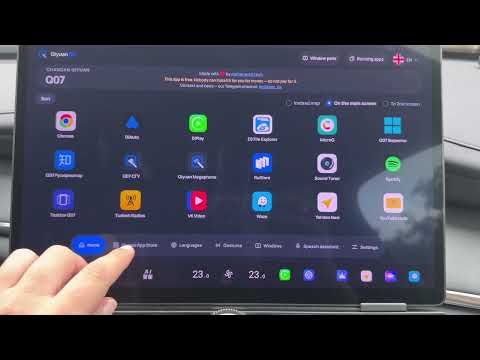
- 01
What you need
Prepare a Windows laptop, a USB flash drive formatted as FAT32, and a data cable. On the car, use the BLUE USB port. The adapters shown in the video were only for experiments with a Mac.
- 02
Open the Telegram bot
Get your engineering-mode key from a Telegram bot — choose one:
Our own bot. Press Start and choose your language, then subscribe to the channel and join the chat it links and press Check.
Optional alternative. Follow the channel link it gives and press Subscribe, open the chat link and join it, then return to the bot and press Start.
- 03
Add your car and start the key
In the bot, add your car: choose Qiyuan Q07, enter the VIN and check every character. Then, from the main menu, start getting the key and select the VIN you added.
Double-check the VIN. Do not send an incorrect VIN.
- 04
Find the flash drive serial number
Insert the flash drive into the laptop. If an old key file is still on it, delete it. To find the serial number, run the command below. In the result find the USB flash drive, not the laptop's internal disk, and send its serial number to the bot with no mistakes or extra spaces.
If the serial number is missing or shows odd characters, use a different flash drive.
Windows (PowerShell)Get-CimInstance Win32_DiskDrive | Format-List Model,SerialNumber,PNPDeviceID,DeviceIDmacOSsystem_profiler SPUSBDataType # find your flash drive and read its "Serial Number"Linuxlsblk -d -o NAME,TRAN,SERIAL,MODEL,SIZE # use the SERIAL of your USB device - 05
Write the key and open Engineering Mode
Download the key file the bot sends and copy it to the root of the same flash drive whose serial number you sent. Safely eject the drive, plug it into the car's blue USB port, and open Engineering Mode with the key.
- 06
Enable ADB in Engineering Mode
In the car, turn off Wi-Fi and any other active internet connection. In Engineering Mode follow the steps shown in the video: go to the USB section, hold the indicated button for about five seconds and confirm. After ADB is enabled, remove the flash drive.
Do not change any other parameter in Engineering Mode.
- 07
Connect the laptop
Connect the data cable to the laptop first, then to the car's blue USB port. On the car screen, allow USB debugging for this computer.
- 08
Download the Qiyuan OS APK
Download the Qiyuan OS APK from the project site. If prompted, confirm the Telegram login, join the project channel and chat, then return to the download page and refresh it.
- 09
Install Android Platform Tools
Download Android Platform Tools, extract the archive, and add the path to the platform-tools folder to the Windows Path variable. In the video the folder is placed in the root of drive C.
Windowshttps://dl.google.com/android/repository/platform-tools-latest-windows.zipmacOShttps://dl.google.com/android/repository/platform-tools-latest-darwin.zipLinuxhttps://dl.google.com/android/repository/platform-tools-latest-linux.zip - 10
Run the install commands
Open the install-commands section on the Qiyuan OS site. Run the command groups in PowerShell in the order shown in the video. Leave the last autostart command for later — it runs after the app is installed.
- 11
Install the APK with the APK Installer
Open the APK Installer shown in the video. It installs APK files through the already-open ADB without typing the install command: choose the folder with the downloaded Qiyuan OS APK, select the file in the list and press Install. Wait for the success confirmation.
- 12
Finish and pair Telegram
Run the autostart command you left for last in PowerShell. Then open Qiyuan OS in the car, choose the language and the Q07 model, and connect the car to the internet. To log in, open Telegram on your phone, scan the code on the car screen and confirm the authorization.